What Is a Cloud Availability Center (and Why It Matters for Your Business)
A cloud availability center is a centralized, personalized dashboard that lets you monitor the real-time status, maintenance schedules, and service health of your cloud products — all in one place.
Here’s a quick summary of what it does:
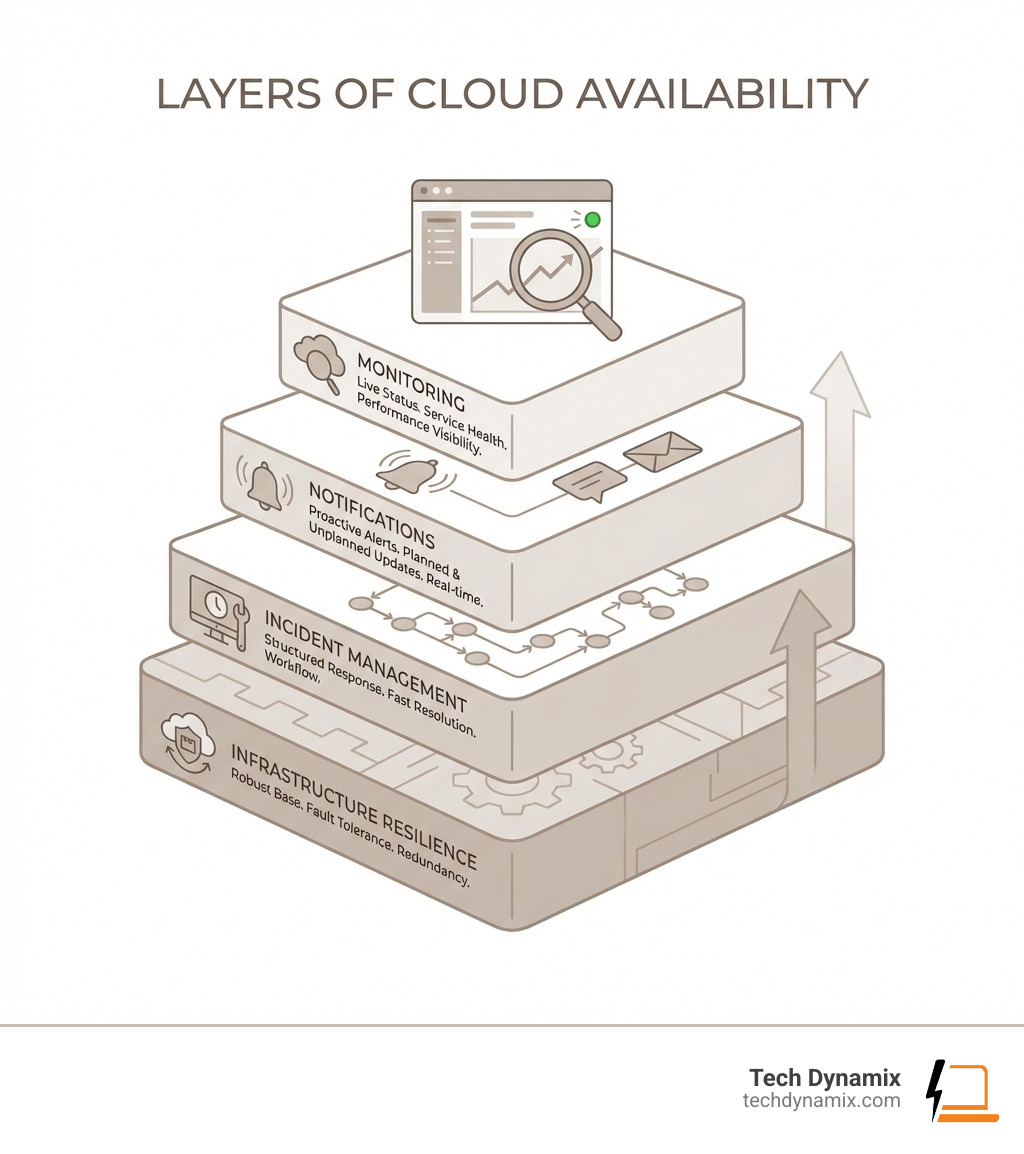
- Monitors cloud service status — see live updates on uptime, disruptions, and degradations
- Sends proactive notifications — alerts for planned maintenance, major upgrades, and unexpected outages
- Provides historical reporting — review past incidents and availability trends
- Personalizes your view — filter by the specific cloud services your business actually uses
- Reduces response time — no more hunting through emails or multiple dashboards to find answers
Cloud performance transparency is becoming a core expectation — not a bonus feature. Whether you’re running SAP, Oracle, or another cloud platform, knowing the status of your systems before your users do is a real competitive advantage.
For Northeast Ohio businesses managing cloud complexity, the stakes are simple: downtime costs money, and surprises cost trust.
I’m Jay Baruffa, and with over 20 years in IT infrastructure and systems support, I’ve helped businesses navigate exactly these kinds of cloud availability challenges — from architecting redundant networks to building proactive monitoring strategies around a cloud availability center approach. Let’s walk through everything you need to know.
Understanding the Role of a Cloud Availability Center
When we talk about a cloud availability center, we aren’t just talking about a website with a green checkmark. We are talking about the primary engine for transparency between a cloud provider and your business. Its primary purpose is to eliminate the guesswork. In the old days of on-premise servers, if a system went down, you could walk into the server room and see the blinking red lights. In the cloud, those “lights” are virtual, and the availability center is your window into that room.
By providing a single pane of glass, these centers significantly improve the customer experience. Instead of your IT team spending hours wondering if a slow application is a local network issue or a global service outage, they can check the dashboard and get an answer in seconds. This level of real-time monitoring is a cornerstone of effective Managed IT Services, ensuring that technology supports business goals rather than hindering them.
The Primary Purpose of a Cloud Availability Center
The core mission of a cloud availability center is to act as a centralized gateway for service status. It’s designed to provide fast, easy visibility into critical information without requiring you to hunt through dozens of different screens or sift through a cluttered email inbox.
For example, the Cloud Availability SAP for Me portal allows users to see exactly what is happening with their specific cloud products. It tracks performance, provides personalized data based on what you actually own, and offers a clear view of upcoming maintenance windows. This transparency builds a “trusted relationship” between the provider and the client—a must-have in today’s digital-first economy.
Accessing Personalized Cloud Information
One of the biggest frustrations for business owners in the Greater Cleveland Area is “information overload.” You don’t need to know if a service in Singapore is down if you only operate out of Mentor or Willoughby. That’s why modern availability centers focus on personalization.
To get started, users typically log in using specific credentials, such as an S-user ID or a Universal ID. Once inside the user dashboard, you can navigate to sections like “Systems & Provisioning” to see a tailored list of your active environments. This level of detail is exactly what we focus on during our IT Consulting & Advisory Services—helping you set up these portals so you only see the data that impacts your bottom line.
Key Features and Benefits of a Cloud Availability Center
A well-designed cloud availability center isn’t just a static page; it’s an interactive tool. Modern versions, such as the updated SAP interface, have significantly reduced system latency, meaning you no longer have to wait for detailed reports to load. You get the information you need, when you need it.
Key features often include:
- Personalization Options: Set your “favorite” services so they appear at the top of your list.
- Historical Reporting: Investigate past incidents to see if there are recurring patterns.
- Maintenance Visibility: See exactly when a system will be offline for updates so you can plan your business operations accordingly.
Improving Customer Experience through a Cloud Availability Center
We’ve found that the biggest benefit to our clients in Lake and Geauga Counties is the ability to engage in proactive planning. When a cloud availability center offers a user-friendly UI, it empowers non-technical managers to understand the health of their services.
Building trust is easier when you have a Cloud System Notification Subscription. By subscribing to these alerts, you aren’t waiting for a frustrated employee to call the helpdesk; you already have an email or text telling you that an “investigation” is underway. This proactivity transforms IT from a “firefighting” department into a strategic asset.
Availability Reporting and Status Nuances
Not every service issue is a total blackout. Modern reporting uses nuanced statuses to give you a better picture of what’s happening:
- Under Investigation: The provider knows something is wrong and is digging into the cause.
- Maintenance Cancellation: A previously scheduled downtime has been called off, meaning you can get back to work.
- Productive vs. Non-productive Systems: You can see if the issue is affecting your live “Productive” environment or just a “Sandbox” or test environment.
For businesses relying on Microsoft 365 Cloud Support, understanding these nuances is vital for determining whether a glitch in Teams or Outlook requires an immediate company-wide announcement or just a “wait and see” approach.
How Infrastructure Design Powers Cloud Resilience
The “magic” behind a cloud availability center actually happens in the physical world. Cloud providers like AWS and Oracle build their data centers in layers to ensure that even if one part fails, the rest keeps running. This is achieved through a combination of Regions and Availability Zones.
| Feature | AWS Regions | Availability Zones (AZs) |
|---|---|---|
| Definition | Geographic locations (e.g., US East) | Discrete data centers within a Region |
| Distance | Hundreds or thousands of miles apart | Up to 60 miles apart |
| Isolation | Completely independent; no shared failure | Independent power and cooling |
| Connectivity | Public/Private internet backbone | Low-latency, redundant metro fiber |
AWS, which pioneered this infrastructure in 2006, operates over 100 of these Availability Zones globally. They are designed to be far enough apart to avoid “shared fate” scenarios (like a local power outage or a flood in Painesville) but close enough for synchronous replication. This means your data is copied across multiple locations in single-digit milliseconds. You can learn more about the physical security of these sites at AWS Data Centers.
Physical and Environmental Operational Controls
A cloud availability center reports high uptime because the data centers themselves are built like fortresses. Providers utilize “N+1 redundancy,” which basically means for every critical component (like a generator or a cooling unit), there is at least one backup ready to go immediately.
Physical security includes:
- Perimeter Security: Multi-factor authentication and 24/7 surveillance.
- Climate Control: Advanced HVAC systems to prevent hardware from overheating.
- Fire Suppression: Automatic detection and localized suppression that doesn’t damage the servers.
- Water Leak Detection: Systems designed to remove moisture before it touches sensitive electronics.
These controls are a vital part of any Backup & Business Continuity plan. Knowing that your cloud provider has these physical protections in place gives you peace of mind that your data is safe from environmental disasters.
The Role of Availability Zones in Preventing Failures
The secret sauce of cloud resilience is “Availability Zone Independence” (AZI). Each AZ is a physically separate set of data centers. They don’t share power substations or cooling equipment. If a tornado hits one zone, the other zones in that region remain unaffected.
This geographic dispersion, combined with fiber isolation and power redundancy, ensures that failures don’t “spread” (or “contagion,” as the techies call it) from one area to another. For a deep dive into how this works, you can check out the Availability Zones Whitepaper.
Navigating Service Notifications and Incident Management
Staying informed is half the battle. When you use a cloud availability center, you can choose how you want to be notified. Most providers offer several subscription methods, including email, SMS, or direct feeds into your internal monitoring tools.
If you are using Oracle services, for instance, you can Check OCI status directly to see if the infrastructure is healthy. But for most businesses, the real value is in the automated alerts that tell you about “Functional Degradation”—where the system is “up,” but a specific feature (like uploading attachments) isn’t working.
Types of Cloud Service Notifications
Understanding the “lingo” of these alerts helps you communicate better with your team:
- Initial Alerts: The first “we see a problem” message.
- Update Notifications: Periodic news on the progress of the fix.
- Resolution Status: The “all clear” message.
- Major Upgrades: Notifications about new features or version changes that might require a quick training session for your staff.
In our work with Cybersecurity Solutions, we always emphasize that staying updated on these notifications is also a security best practice. Sometimes a “service disruption” is actually a response to a security threat, and knowing the details helps you protect your local network.
Incident Management and Post-Incident Analysis
When a major event occurs, cloud providers follow a very strict incident management process. This usually involves:
- Detection: Monitoring tools or customer reports trigger a “high-severity” ticket.
- Mitigation: A “call leader” and a team of “problem resolvers” work to bypass the failure.
- Root Cause Analysis (RCA): After the fix, they dig deep to find out exactly why it happened.
- Correction of Errors (COE): They implement new rules or hardware to make sure that specific error never happens again.
This rigorous process is a key part of any Digital Transformation journey. You aren’t just buying space on a server; you are buying into a culture of continuous improvement and extreme reliability.
Frequently Asked Questions about Cloud Availability Centers
How do I subscribe to cloud disruption notifications?
Most providers make this easy within your cloud availability center dashboard. Look for a “Get Notified” or “Communication Preferences” tab. You can usually opt-in to specific products (like just HR or just Finance) and choose your preferred channel, such as email. Don’t forget to check the “Maintenance Windows” section to see when the provider has planned work, so you aren’t surprised by a Saturday morning update.
What is the difference between service disruption and functional degradation?
Think of a service disruption as a power outage—the lights are out, and nothing works. The service is completely unavailable. A functional degradation, on the other hand, is like having a leaky faucet. The house has water, but one specific part isn’t working right. In cloud terms, this might mean you can log in to your ERP system, but you can’t run a specific report or upload a PDF.
How do providers handle data center capacity planning?
Providers use complex monthly modeling to predict how much “room” they need. They assess infrastructure usage and demand at least once a month to ensure they have enough servers and storage to meet their availability commitments. This scalability is a standard feature of the modern cloud, allowing your business to grow without worrying about running out of digital space.
Conclusion
Navigating cloud computing can feel like trying to read a map in a storm. But with a cloud availability center, you finally have a compass. These tools provide the transparency, proactivity, and detailed reporting that Northeast Ohio businesses need to stay competitive and resilient.
At Tech Dynamix, we specialize in making this complex technology simple. Whether you are in Mentor, Chardon, or Downtown Cleveland, our 20 years of experience in managed IT and cloud migration can help you turn these high-tech tools into real-world business results. From setting up your first Services dashboard to architecting a full disaster recovery plan, we are your dependable all-in-one technology partner.
Ready to take the guesswork out of your cloud uptime? Let’s talk about how we can secure and optimize your business for the long haul.