Why Modern Businesses Are Choosing Managed IT Services
Managed IT services are subscription-based technology support where a specialized third-party provider proactively monitors, maintains, and secures your IT infrastructure remotely—replacing the outdated break/fix model with predictable costs and 24/7 oversight.
Quick Answer for Business Leaders:
- What they are: Outsourced IT management including monitoring, security, cloud services, and helpdesk support
- How they work: Monthly subscription with Service Level Agreements (SLAs) defining response times and uptime guarantees
- Who needs them: Small and mid-size businesses without full in-house IT teams or those seeking to augment existing staff
- Key benefit: Proactive maintenance that prevents problems instead of reacting to failures
- Typical cost: Per-user, per-device, or tiered pricing ($30-$100 per service per device for à la carte options)
If you’ve ever had a server crash during critical business hours or watched productivity grind to a halt while waiting for a technician to arrive, you understand the real cost of reactive IT support. Traditional break/fix approaches leave businesses vulnerable—you only get help after something breaks, costs are unpredictable, and downtime directly impacts your bottom line.
The managed services model flips this script entirely. Instead of waiting for disasters, Managed Service Providers (MSPs) continuously monitor your systems, patch vulnerabilities before they’re exploited, and maintain infrastructure health around the clock. For Northeast Ohio businesses navigating cybersecurity threats, cloud migrations, and compliance requirements, this proactive approach has become essential.
The shift to managed IT didn’t happen overnight. The model emerged in the early 2000s as businesses struggled to keep pace with exponential technology growth. Companies that once managed a handful of computers suddenly faced complex networks, cloud integrations, and sophisticated security threats—all while the talent gap in IT roles widened to unprecedented levels.
I’m Jay Baruffa, and over the past 20 years working with IT systems support and infrastructure design across Northeast Ohio, I’ve helped businesses transition from reactive break/fix chaos to proactive managed IT services that reduce risk and improve efficiency. At Tech Dynamix, we’ve built our practice on making complex technology simple and reliable for growing organizations.
What are Managed IT Services?
At its core, managed IT services involve the practice of outsourcing day-to-day IT management and support to a third-party vendor, known as a managed service provider (MSP). Instead of having an in-house team juggle everything from password resets to complex network architecture, you partner with experts who take long-term responsibility for the health and functionality of your IT environment.
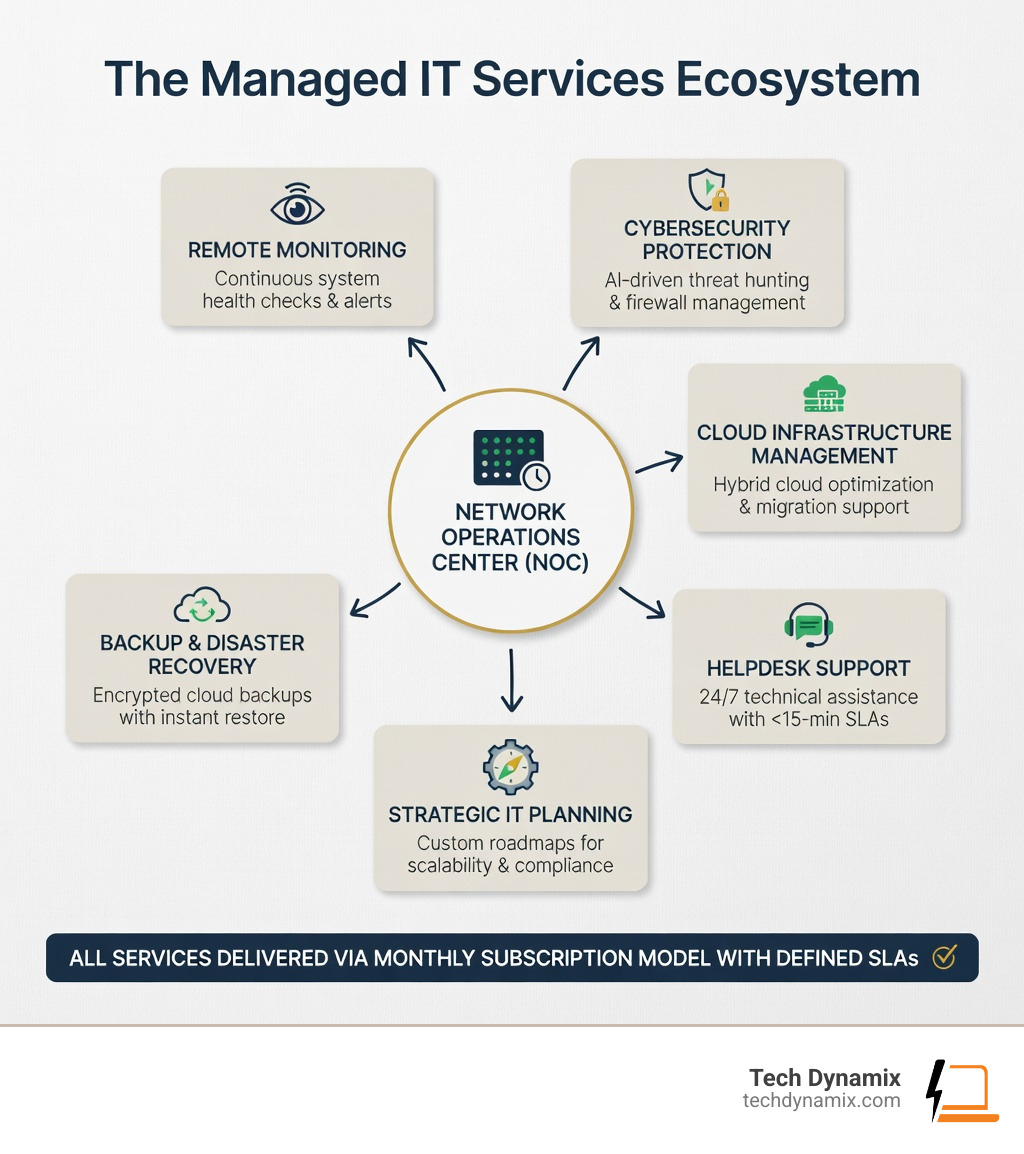
This isn’t just a fancy way of saying “outsourced helpdesk.” It is a comprehensive approach to technology. As an MSP, we act as your strategic partner, providing Services that cover the entire digital landscape of your business. This includes:
- Remote Monitoring and Management (RMM): We use specialized software to keep an eye on your servers, workstations, and network 24/7.
- Proactive Maintenance: We handle the “boring” but vital stuff—like patch management and predictive maintenance—so your systems don’t fail when you need them most.
- Security Oversight: We implement robust defenses to protect your data from the ever-evolving landscape of cyber threats.
- Strategic Planning: We don’t just fix what’s there; we help you plan for the future with hardware refreshes and digital transformation roadmaps.
According to Wikipedia, the key differentiator is the proactive nature of the relationship. We aren’t just waiting for your call; we’re working behind the scenes to ensure you never have to make that call in the first place.
Managed IT services vs. Break/Fix Support
To understand why managed IT services are the modern standard, we have to look at what they replaced: the “Break/Fix” model.
In a break/fix scenario, the relationship is purely reactive. Something breaks (a server dies, a printer stops working, or a virus encrypts your files), and you call a technician. They come out, fix the problem, and send you a bill. While this sounds simple, it creates several major headaches for small and mid-size businesses:
- System Downtime: By definition, you only get help after productivity has already stopped.
- Unpredictable Costs: Your IT budget becomes a roller coaster. One month it’s $0; the next month, a major hardware failure costs you thousands.
- Conflict of Interest: In a break/fix model, the technician makes more money when things break. In a managed model, we make more money when things stay working, aligning our goals with yours.
- Scalability Issues: As your business grows from 5 employees in Mentor to 50 across Lake and Geauga counties, the break/fix model becomes too chaotic to manage.
The History and Evolution of MSPs
The journey to modern managed services began in the 1990s with Application Service Providers (ASPs). These early pioneers paved the way by offering remote hosting for applications. However, the real shift happened in the early 2000s.
As computer networks became more complex, the “man in a van” break/fix technicians couldn’t keep up. The industry saw a massive Transition from VAR to MSP. Value-Added Resellers (VARs), who primarily sold hardware, realized that businesses needed ongoing support, not just a one-time sale.
By 2006, the first foundational books on managed services were published, and the model we know today—focused on RMM, flat-fee pricing, and proactive oversight—became the industry standard for organizations that want to focus on their core business rather than their server room.
Service Models and Pricing Structures
One of the biggest draws of managed IT services is financial predictability. Instead of guessing what IT will cost this year, you get a clear, monthly line item. Most MSPs use one of several common pricing models to keep things transparent:
| Pricing Model | How it Works | Best For |
|---|---|---|
| Per-User | A flat monthly fee for every employee supported. | Growing businesses with a mobile workforce. |
| Per-Device | Fees based on the number of laptops, servers, and tablets managed. | Businesses with a high ratio of devices to people. |
| Tiered | Packages (Silver, Gold, Platinum) with varying levels of support. | Companies that want to pick and choose specific service levels. |
| À La Carte | Paying for specific services like backup or security individually. | Very small businesses with specific, narrow needs. |
| Value-Based | A flat fee based on the overall complexity and value of the IT environment. | Organizations looking for a true “all-in” partnership. |
At Tech Dynamix, our Managed Services focus on providing a “right-sized” approach. We often see à la carte pricing ranging from $30 to $100 per service per device, but most businesses find the best value in bundled, per-user models that cover everything from helpdesk to cybersecurity.
Fully Managed, Co-managed, and Hybrid Models
Not every business needs the same level of intervention. Depending on your current setup, you might choose one of these three models:
- Fully Managed: We become your IT department. We handle everything from the “on” switch to the cloud. This is perfect for SMBs in Northeast Ohio that don’t want the overhead of a full-time IT salary.
- Co-managed: You have an internal IT person, but they are overwhelmed. We act as their “force multiplier,” handling routine tasks like patching and monitoring so they can focus on high-level business projects.
- Hybrid: This model combines specialized MSP support with internal teams. For example, we might handle your Cybersecurity Solutions and Backup & Business Continuity, while your internal team handles day-to-day user requests.
Cloud Computing in Managed IT Services
Modern managed IT services are inseparable from cloud computing. The days of having a hot, noisy server closet are fading. We now leverage the cloud to provide faster, more scalable solutions.
A major focus for us is Microsoft 365 Cloud Support. By moving your productivity suite to the cloud, we ensure your team in Willoughby or Mayfield Heights can collaborate from anywhere securely. We also utilize technologies like Azure Virtual Desktop to provide secure, remote work environments without the need for expensive local hardware.
The 2023 State of Cloud report highlights that while cloud adoption is high, many businesses lack the expertise to manage it efficiently. That’s where an MSP adds value—we optimize your cloud spend and ensure your data is protected with “14 nines” of durability and configurable data protection.
Key Benefits: Security, Compliance, and Efficiency

Why do local businesses make the switch? It usually comes down to three pillars: saving money, gaining expertise, and sleeping better at night.
- Cost Reduction: Hiring a single Tier 3 IT administrator in the Greater Cleveland Area can cost upwards of $80,000–$100,000 plus benefits. An MSP gives you access to a whole team of experts for a fraction of that cost.
- Bridging the Talent Gap: There is a massive shortage of IT talent right now. MSPs allow you to “rent” high-level expertise that is otherwise hard to find and keep.
- Operational Efficiency: When your technology works, your people work. We eliminate the “micro-downtimes” that eat away at your profit margins.
Service Level Agreements (SLAs) and Accountability
When you sign up for managed IT services, you aren’t just buying “help.” You are buying a guarantee. This is outlined in the Service Level Agreement (SLA). According to IBM’s criteria, a strong SLA should clearly define:
- Response Times: How quickly we will acknowledge your problem.
- Resolution Procedures: What happens if a problem can’t be fixed immediately.
- Uptime Guarantees: The percentage of time your critical systems are guaranteed to be operational.
- Performance Metrics: How we measure our success and keep ourselves accountable to you.
Addressing Cybersecurity and Compliance
For our clients in healthcare, finance, and manufacturing, compliance isn’t optional—it’s a legal requirement. Whether it’s HIPAA, PCI-DSS, or CMMC, the regulatory landscape is a minefield.
We help you overcome app security hurdles by implementing proactive threat protection. This includes everything from multi-factor authentication (MFA) to advanced endpoint detection. Furthermore, our Backup & Business Continuity services ensure that if a disaster—natural or digital—strikes, your data is safe and your business can be back up and running in hours, not weeks.
Choosing and Transitioning to an MSP
Selecting the right partner is a big decision. You aren’t just buying a service; you are choosing the “guardians” of your business data. When looking for an MSP in Northeast Ohio, consider their track record and their ability to scale with you.
Steps to an Effective Transition
We’ve refined our onboarding process over 20 years to make it as painless as possible. If you’re considering the move, here is what the roadmap looks like:
- Infrastructure Assessment: We perform a deep dive into your current systems to find “skeletons in the closet” and security holes.
- Strategic Audit: We look at your business goals. Are you planning to expand to a new office in Ashtabula? Do you need to support more remote workers in Chardon?
- Transition Planning: We create a detailed map of responsibilities, so there is no confusion about who handles what.
- Documentation and Onboarding: We document every part of your network so that our technicians have the “keys to the kingdom” ready whenever you need help.
Our IT Consulting & Advisory team ensures that this transition isn’t just about moving servers; it’s about aligning your technology with your vision for the company.
Frequently Asked Questions about Managed IT
What are the main pros and cons of managed IT?
Pros:
- Predictable Monthly Costs: No more “surprise” $5,000 bills.
- 24/7/365 Support: Problems don’t only happen between 9 and 5.
- Access to Experts: You get a team of specialists instead of one generalist.
- Proactive Security: We stop threats before they hit your inbox.
Cons:
- Accountability: You have to trust a third party with your systems (which is why choosing a reputable local partner is vital).
- Less “Physical” Presence: Most work is done remotely (though we still provide onsite support when needed!).
How do MSPs provide 24/7 monitoring and support?
We use Remote Monitoring and Management (RMM) tools that act as digital “smoke detectors.” These tools alert our Network Operations Center (NOC) the moment a server starts running too hot or a hard drive shows signs of failing. Often, we can apply an automated patch or fix a service before you even realize there was an issue. For everything else, our helpdesk ticketing system ensures that requests are prioritized and handled by the right expert immediately.
Can managed services help with remote work?
Absolutely. In fact, this is where we shine. Through Microsoft 365 Cloud Support and robust Network Design & Management, we help businesses create a “borderless office.” Whether your team is in Mentor, Eastlake, or working from home in the Chagrin Valley, we provide secure VPNs, mobile device management (MDM), and cloud-based collaboration tools that keep everyone connected and protected.
Conclusion
The world of technology isn’t getting any simpler. For small and mid-size businesses in Northeast Ohio, trying to “DIY” your IT is a recipe for stress and lost revenue. Managed IT services offer a way to level the playing field, giving you the same high-level security and infrastructure as a Fortune 500 company at a price that fits your budget.
At Tech Dynamix, we are proud to be a local partner for businesses from Lake County to the Cleveland Metro East corridor. With over two decades of experience, we don’t just fix computers—we build the digital foundations that allow your business to grow.
Ready to stop worrying about your IT and start focusing on your business? Learn more about our Managed Services and let’s see how we can help you move forward.