What Is IT Infrastructure Management (And Why It Matters)?
IT infrastructure management is the oversight and administration of an organization’s hardware, software, networks, and data storage to keep systems running reliably, securely, and efficiently.
Here’s a quick breakdown:
- What it covers: Servers, networks, storage, operating systems, cloud services, and security
- What it does: Keeps systems online, secure, and aligned with business goals
- Why it matters: Poor management leads to downtime, security breaches, and wasted spending
- Who handles it: IT managers, infrastructure teams, or managed service providers (MSPs)
Think of IT infrastructure as the engine under the hood of your business. When it runs well, nobody notices. When it doesn’t, everything stops.
The stakes are real. According to research by ITIC, 91% of organizations report that downtime costs them more than $300,000 per hour. For most businesses in Northeast Ohio, even a fraction of that kind of loss is simply not acceptable.
And yet, many organizations are running their infrastructure reactively — fixing problems after they happen instead of preventing them in the first place.
That’s exactly what this guide is here to help you change.
I’m Jay Baruffa, and with over 20 years of hands-on experience in IT systems support and infrastructure design, I’ve helped countless businesses across Northeast Ohio build reliable, scalable IT infrastructure management strategies that reduce risk and support long-term growth. In the sections ahead, I’ll break down everything you need to know — from core components and best practices to emerging trends — so you can make smarter decisions about your technology.
The Core Pillars of IT Infrastructure Management
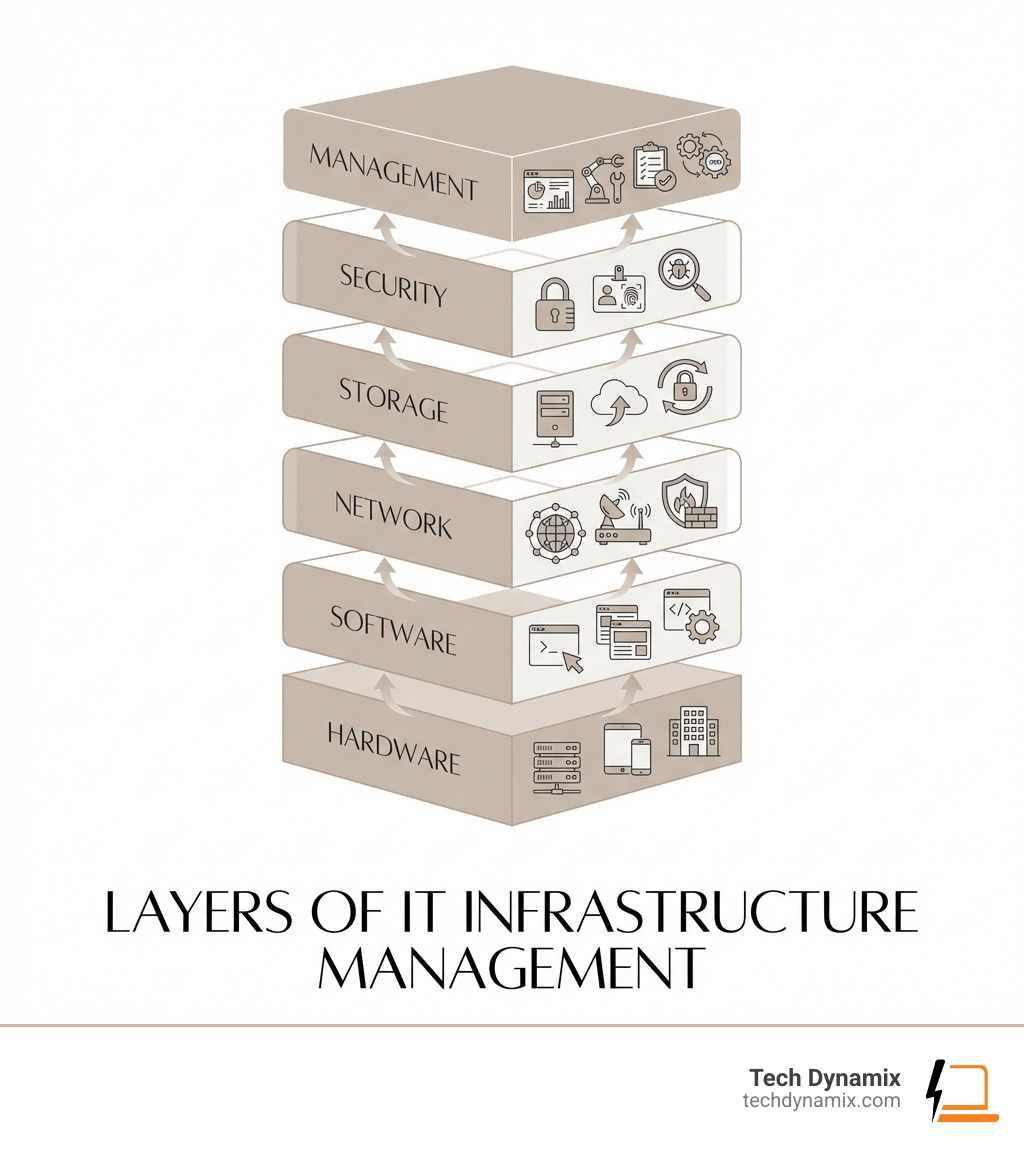
To manage something effectively, you first have to know what’s in the box. IT infrastructure isn’t just a single server sitting in a dusty closet in Willoughby; it is a composite of hardware, software, network resources, and services required for the existence and operation of an enterprise IT environment.
According to AWS, these components work together to deliver IT services and solutions. In a modern setup, this includes:
- Hardware: The physical “stuff” like servers, computers, tablets, and routers.
- Software: Operating systems (OS), applications like CRM or ERP systems, and middleware.
- Network Resources: The “glue” that connects everything, including your LAN, WAN, and internet connectivity.
- Data Storage: Where your business “memory” lives, whether on physical hard drives or in the cloud.
- Facilities: The physical locations, like data centers, including the cooling and power systems that keep the machines breathing.
By focusing on gaining efficiency across these pillars, we can transform a collection of parts into a high-performance business platform.
Defining the Essential Components
We typically break IT infrastructure management down into three main functional areas:
- Systems Management: This involves overseeing the “brains” of the operation—your servers and operating systems. It includes everything from provisioning new virtual machines to ensuring patches are applied so your software doesn’t leave the door open for hackers.
- Network Management: This is about keeping the lines of communication open. We manage the routers, switches, and firewalls to ensure data flows quickly and securely between your office in Mentor and your remote workers in Cleveland.
- Storage Management: With data creation projected to grow 24% in 2023 alone, managing where that data goes is a full-time job. We ensure you have the space you need and that your data is indexed and accessible.
To do this right, we often look to frameworks like ITIL (Information Technology Infrastructure Library) and ITSM (IT Service Management). ITIL provides a library of best practices that help us align IT services with your business needs. It’s not just about fixing a broken mouse; it’s about a systematic approach to change management, asset tracking, and service delivery.

The Strategic Value of IT Infrastructure Management
Why do we spend so much time obsessing over these details? Because effective management delivers massive strategic value:
- Operational Efficiency: Automation reduces manual workloads, freeing your team to focus on growth rather than “putting out fires.”
- Cost Control: By optimizing resources, we prevent “technology sprawl” where you’re paying for cloud subscriptions or hardware you don’t actually use.
- Scalability: A well-managed infrastructure grows with you. If you expand from a small shop in Eastlake to a multi-county operation, your systems should handle the load without a total rebuild.
- Compliance: For our clients in healthcare or financial services, staying compliant with HIPAA or other regulations is mandatory. Proper infrastructure management ensures the necessary logs and security controls are always in place.
Why Business Success Depends on Reliable Systems
In today’s market, your technology is your business. If your systems are down, your employees can’t work, your customers can’t buy, and your reputation takes a hit.
As mentioned in the intro, the $300,000 hourly downtime cost is a terrifying reality for 91% of organizations. Even for a smaller business in Northeast Ohio, losing a full day of productivity can be the difference between a profitable quarter and a deficit.
But it’s not just about avoiding disaster. Reliable systems fuel digital transformation. When your infrastructure is stable, you can adopt new tools—like AI-driven analytics or advanced project management software—that give you a competitive edge over businesses still struggling with legacy hardware.
Enhancing Security and Compliance
Security isn’t a “set it and forget it” feature; it’s a core component of IT infrastructure management. We integrate cybersecurity solutions into every layer of the stack.
Effective management includes:
- Encryption: Protecting data while it sits on your server and while it travels across the web.
- Access Control: Using Role-Based Access Control (RBAC) to ensure employees only see the data they need to do their jobs.
- Threat Detection: Proactive monitoring to spot a breach before it becomes a headline.
By maintaining high standards, we help you navigate the complex web of regulatory requirements, protecting your business from both hackers and hefty fines.
Driving Growth Through Automation and Virtualization
The secret weapon of modern IT is automation. By automating repetitive tasks—like software updates or system backups—we minimize human error and speed up operations.
Virtualization takes this a step further. Instead of having ten physical servers taking up space and sucking electricity, we can run ten “virtual” servers on one powerful machine. This improves hardware utilization and makes it much easier to scale. Considering that data creation is projected to grow 24% year-over-year, being able to spin up new storage or processing power instantly is vital for staying agile.
Navigating Environments: From Traditional to Hyperconverged
IT environments have evolved significantly over the last 15 years. We no longer just choose between “on-premise” and “cloud.” Today, it’s about finding the right mix.
| Feature | Traditional | Cloud | Hybrid | Hyperconverged (HCI) |
|---|---|---|---|---|
| Location | On-site data center | Third-party provider | Both on-site & cloud | On-site (usually) |
| Scalability | Slow (buy hardware) | Instant (pay-as-you-go) | Flexible | Rapid (add nodes) |
| Control | Total | Limited by provider | High | Total |
| Complexity | High (siloed parts) | Low (managed) | High (integration) | Low (consolidated) |
The Rise of Hyperconverged Infrastructure (HCI)
Many organizations are turning to hyperconverged infrastructure because it radically simplifies management. In a traditional setup, you have separate vendors for your servers, your storage, and your networking. If something breaks, the “finger-pointing” starts.
HCI consolidates compute, storage, and virtualization into a single, software-defined system. This provides:
- Centralized Control: Manage your entire data center from one screen.
- High Availability: If one part of the system fails, another takes over instantly.
- Operational Simplicity: You don’t need a specialist for every single component.
Managing Hybrid and Multi-Cloud Landscapes
While HCI is great for on-site needs, most businesses use a hybrid model. You might keep your sensitive financial data on a local server in Painesville but use Microsoft 365 for email and collaboration.
The challenge here is network connectivity. You need a seamless flow of data between your office and the cloud. Effective IT infrastructure management ensures that these different environments talk to each other securely, preventing “data silos” where information gets stuck in one system and can’t be used by another.
Best Practices and Strategic Oversight
Managing IT isn’t just a technical job; it’s a leadership role. Whether you have an internal team or work with a partner for IT consulting and advisory, you need a roadmap.
Implementing Best Practices for IT Infrastructure Management
To keep your systems in peak condition, we recommend these core practices:
- Standardization: Don’t have five different types of laptops and three different server brands. Standardizing your hardware and software makes troubleshooting much faster.
- Proactive Maintenance: Don’t wait for a “blue screen of death.” We use monitoring tools to spot failing hard drives or high CPU usage before they cause a crash.
- Documentation: If your “IT guy” is the only one who knows the password to the firewall, you have a major risk. Document every configuration, policy, and vendor contact.
- Patch Management: Automate your security updates. Hackers love “known vulnerabilities” that businesses simply forgot to patch.
Disaster Recovery and Business Continuity
If a tornado hits Lake County or a server room floods in Chardon, can your business survive? Backup and business continuity planning is the “insurance policy” of your IT infrastructure.
A solid plan includes:
- Risk Assessment: Identifying what could go wrong.
- Recovery Objectives: Deciding how quickly you need to be back online (RTO) and how much data you can afford to lose (RPO).
- Failover Systems: Having a secondary system that kicks in automatically if the primary one fails.
- Regular Testing: A disaster recovery plan is just a piece of paper until you’ve actually tested it with a simulation.
Future Trends: AI, Edge, and Beyond
The world of IT infrastructure management is moving fast. We’re shifting from reactive “break-fix” models to autonomous, self-healing systems.
Key Features of Modern Management Solutions
When looking for tools or partners to manage your infrastructure, look for these features:
- AIOps (Artificial Intelligence for IT Operations): Systems that use machine learning to predict failures and even fix them without human intervention.
- Heterogeneous Support: The ability to manage Windows, Mac, Linux, and various cloud platforms all in one place.
- Trend Analysis: Tools that don’t just tell you what’s happening now, but show you patterns so you can plan for future capacity needs.
Emerging Trends in IT Infrastructure Management
- Edge Computing: Instead of sending all data to a central cloud, we process it “at the edge”—closer to where it’s created (like on a factory floor in Ashtabula). This reduces latency and saves bandwidth.
- Zero-Trust Security: The old “perimeter” is dead. Zero-trust assumes that threats could be inside or outside the network, requiring constant verification for every user and device.
- Sustainable IT: As energy costs rise, managing infrastructure for power efficiency is becoming a top priority for eco-conscious businesses.
- Platform Engineering: This is a new way of designing systems so that developers can “self-serve” the infrastructure they need, speeding up innovation.
Frequently Asked Questions about IT Infrastructure
What are the three main areas of IT infrastructure?
The three main areas are Hardware (physical devices), Software (operating systems and apps), and Networking (the connections and protocols that allow data to move). Some experts also include Data Storage as a fourth distinct pillar.
What is the difference between IT infrastructure management and IT operations?
Think of it this way: Infrastructure management is about the “assets” (the servers, the wires, the software), while IT operations is about the “processes” (the daily tasks, the helpdesk, the service delivery). Infrastructure management is a specialized part of the broader IT operations umbrella.
What does an IT infrastructure manager do?
An IT infrastructure manager oversees the entire lifecycle of technology assets. This includes planning for new hardware, managing vendor relationships, ensuring security compliance, coordinating with the helpdesk, and making sure the technology roadmap aligns with the company’s business goals.
Conclusion
At the end of the day, IT infrastructure management isn’t about the latest gadgets or the fastest processors. It’s about building a foundation that lets your business do what it does best without being held back by technical glitches or security fears.
Whether you’re a manufacturer in Mentor or a nonprofit in Greater Cleveland, your technology should be a strategic asset, not a source of stress. At Tech Dynamix, we bring over 20 years of local expertise to the table, helping small and mid-size businesses across Northeast Ohio navigate these complexities with ease.
From proactive support to cloud migrations and disaster recovery, we’re here to be your all-in-one technology partner. Ready to build a roadmap for your long-term success?
Explore our comprehensive Managed IT Services and let’s get your infrastructure running like the well-oiled machine it was meant to be.