How Much Does Managed IT Support Really Cost in 2026?
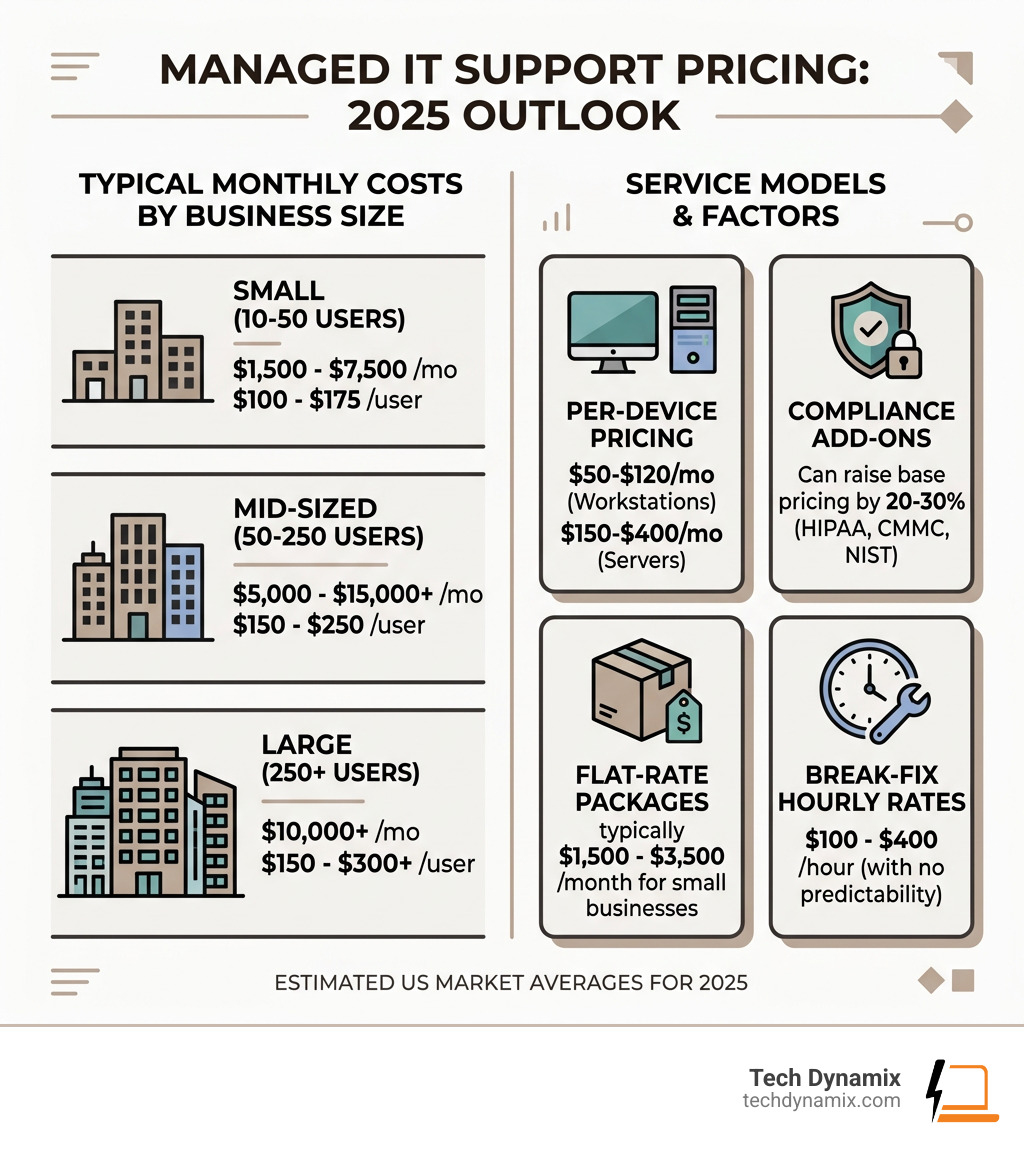
Managed IT support pricing typically ranges from $100 to $400 per user per month in the US, depending on your business size, service level, and compliance needs. Here’s a quick snapshot:
| Business Size | Typical Monthly Cost | Per User Range |
|---|---|---|
| Small (10-50 users) | $1,500 – $7,500/mo | $100 – $175/user |
| Mid-sized (50-250 users) | $5,000 – $15,000+/mo | $150 – $250/user |
| Large (250+ users) | $10,000+/mo | $150 – $300+/user |
- Per-device pricing: $50-$120/month for workstations, $150-$400/month for servers
- Flat-rate packages for small businesses typically run $1,500-$3,500/month
- Compliance add-ons (HIPAA, CMMC, NIST) can raise base pricing by 20-30%
- Break-fix hourly rates run $100-$400/hour — with no predictability
Most business owners we talk to in Northeast Ohio have the same frustration: they’re not sure if they’re overpaying for IT support, or quietly underinvesting in ways that leave them exposed. A single ransomware incident can cost a small business an average of $108,000 — yet many are still making IT decisions based on the lowest monthly quote.
This guide cuts through the noise. Whether you’re comparing providers, building a budget, or just trying to understand what you’re actually paying for, you’ll find real numbers and honest context here.
I’m Jay Baruffa, founder of Tech Dynamix, and with over 20 years in IT infrastructure and systems support, I’ve helped dozens of Northeast Ohio businesses make sense of managed IT support pricing and find the right level of service for their needs. Let’s break it all down so you can make a confident, informed decision.
Basic managed it support pricing terms:
Common Managed IT Support Pricing Models
When you start looking for a partner in Northeast Ohio—whether you’re in Mentor, Willoughby, or downtown Cleveland—you’ll notice that not every quote looks the same. That’s because Managed Service Providers (MSPs) use several different ways to calculate your bill.
As defined by Gartner’s definition of Managed Service Providers, an MSP is a provider that delivers services, such as network, application, infrastructure, and security, via ongoing and regular support and active administration on customers’ premises, in their MSP’s data center (hosting), or in a third-party data center.
How they charge for that “active administration” usually falls into one of these categories:
Per-User and Per-Device Structures
These are the “bread and butter” of the industry. They are easy to understand and scale as you grow.
- Per-User Pricing: This is the most popular model in 2026. You pay a flat fee for every employee who uses technology. The beauty of this is that it usually covers all their devices—laptop, desktop, tablet, and smartphone. It aligns our goals with yours: we want your users to be productive, not just their hardware.
- Per-Device Pricing: Here, you pay based on the “inventory” of your office. You might pay $60 for a workstation, $200 for a server, and $30 for a firewall. This works well if you have a lot of employees sharing a few computers (like a manufacturing floor in Painesville), but it can get messy if one person has three different devices.
| Asset Type | Typical Monthly Cost (2026) |
|---|---|
| Workstation/Laptop | $50 – $150 |
| Server (Physical or Virtual) | $150 – $400 |
| Network Firewall | $75 – $250 |
| Managed Switch | $15 – $75 |
| Mobile Device (MDM) | $15 – $40 |
If you want to dive deeper into what these assets actually require, check out more info about IT services.
Tiered vs. Flat-Rate Managed IT Support Pricing
Think of this like your cable bill or a gym membership.
- Tiered Pricing: Most MSPs offer “Bronze, Silver, and Gold” levels. A Bronze plan might just be “monitoring and patching,” meaning we tell you if something breaks, but you pay extra for us to fix it. A Gold plan is usually “all-you-can-eat” support.
- Flat-Rate (All-Inclusive): This is our favorite for small businesses in Lake and Geauga counties. You pay one monthly fee that covers everything—helpdesk, security, backups, and strategy. No “nickeling and diming.” It’s the ultimate IT support that saves you money because it turns your IT from an unpredictable variable into a fixed, manageable line item.
Average Costs and Service Inclusions for 2025-2026
In 2026, the “average” cost is a bit of a moving target because the technology landscape is changing so fast. AI, advanced ransomware, and remote work have made IT management more complex than it was even two years ago.
For a small business in the Greater Cleveland Area with 20 employees, you might see a “Standard” package at around $2,500 to $3,500 per month. If you need “Advanced Security” (which we highly recommend given that cyberattacks increased 47% recently), that could jump to $4,000+.
Estimating Your Managed IT Support Pricing by Business Size
Scale plays a huge role in your final number. While a 10-person law firm in Chardon might pay more per user, a 100-person manufacturing plant in Eastlake benefits from “economies of scale.”
- Small (10-25 Employees): Expect to pay $125 – $275 per user. At this size, you’re buying an entire IT department for the cost of one entry-level hire.
- Mid-Sized (50-150 Employees): Rates often dip to $100 – $200 per user. You likely have more standardized equipment, which makes it more efficient for us to manage.
- Large (150+ Employees): Costs can range widely ($85 – $250+) depending on whether we are your full IT team or if we are “co-managing” alongside your existing internal IT person.
Wondering why businesses choose this path? Take a look at Why Us to see how we tailor these scales to local businesses.
Standard vs. Premium Service Inclusions
What are you actually getting for that monthly check?
Standard Inclusions (The Basics):
- 24/7 Network Monitoring
- Patch Management (keeping Windows and apps updated)
- Antivirus and Malware protection
- Remote Helpdesk Support (9 am – 5 pm)
- Basic Backup Management
Premium Inclusions (The “Peace of Mind” Stuff):
- vCIO Services: A “Virtual Chief Information Officer” who meets with you quarterly to plan your budget and technology roadmap.
- Advanced Cybersecurity: Endpoint Detection and Response (EDR), which is like having a security guard inside every computer.
- Disaster Recovery: Not just backing up files, but the ability to run your entire business in the cloud if your server dies.
- Cloud Administration: Managing your Microsoft 365, Azure, or Google Workspace environment.
For a full breakdown of these levels, see more info about managed services.
Key Factors That Drive IT Support Costs
If you get three quotes and they vary by $1,000, it’s usually because of these “under the hood” factors.
- Infrastructure Complexity: Do you have one office in Willoughby, or five locations across Northeast Ohio? Do you have legacy software that requires a 15-year-old server to run? The more complex the setup, the higher the cost.
- Service Level Agreements (SLAs): Do you need a 1-hour response time for every issue, or is 4 hours okay? Do you need 24/7/365 support, or just Monday through Friday?
- User Savviness: If your team is tech-savvy, they open fewer tickets. If they need help with every password reset and printer jam, the labor cost for the MSP goes up.
Compliance, Complexity, and Cybersecurity Needs
This is the biggest price mover in 2026. If you are in healthcare (HIPAA) or defense contracting (CMMC/NIST), your IT isn’t just about “fixing things”—it’s about legal survival.
Compliance packages typically add 20-30% to your monthly bill. Why? Because we have to perform regular audits, maintain exhaustive documentation, and use military-grade encryption tools. With cyberattacks now hitting organizations nearly 1,925 times per week on average, these “extras” are becoming the new standard. You can learn how to slash your IT costs by optimizing these security layers.
Onboarding Fees and Hidden Contract Terms
Don’t just look at the monthly fee. Ask about the “Onboarding Fee.”
Most reputable MSPs in the Cleveland Metro East Corridor charge a one-time fee (often equal to one month of service) to get you started. This covers:
- Documenting every password and serial number.
- Stabilizing your network (fixing the “gremlins” left by the last guy).
- Installing our security and monitoring tools on every machine.
Watch out for “Hidden Fees” like:
- Travel Fees: Some companies charge for the drive time to your office in Ashtabula.
- Project Labor: Does your contract cover installing a new server, or just maintaining the old one?
- Termination Clauses: Are you locked in for 3 years with no way out?
For more on how to streamline this transition, check out more info about gaining efficiency.
Managed IT vs. Break-Fix: Total Cost of Ownership
The “Break-Fix” model is the old way: something breaks, you call a guy, he charges you $150/hour to fix it. It sounds cheaper because you only pay when there’s a problem.
The Reality: Break-fix is actually the most expensive way to run a business.
- The Incentive is Wrong: A break-fix tech only makes money when you are down. We make money when you are up.
- Downtime Costs: If 20 employees can’t work for 4 hours while you wait for a tech to show up, you didn’t just lose $600 in repair fees—you lost $3,000+ in payroll and productivity.
- The “Surprise” Bill: A server crash in the break-fix world can result in a $5,000 emergency bill you didn’t budget for.
Managed IT offers a much better Return on Investment (ROI) by preventing those 4-hour outages before they happen.
Comparing In-House Staffing to Outsourced Support
Many mid-sized businesses in Lake County wonder if they should just hire an “IT guy.”
Let’s look at the math for 2026:
- In-House IT Manager: $85,000 salary + $25,000 benefits/taxes = $110,000/year.
- Managed IT (50 users): $150/user = $7,500/mo = $90,000/year.
For $20,000 less, you get a whole team of specialists (security, cloud, helpdesk) instead of one person who needs vacations, sick days, and might quit for a better offer. Outsourcing gives you a “fractional team” that never sleeps. This is a key part of IT support that saves you money.
Frequently Asked Questions about IT Support Costs
Is managed IT cheaper than hiring in-house?
For almost any business under 100 users, yes. You get access to $100k+ worth of specialized software tools and a team of experts for a fraction of the cost of one full-time senior engineer. Once you hit 150+ users, a “Co-managed” model (one internal person plus an MSP for heavy lifting) often becomes the most efficient route.
How do compliance requirements like HIPAA affect my rate?
Compliance requires specialized tools (log aggregators, encrypted email, advanced auditing) and more “human hours” for documentation. Expect a 20-30% premium. However, this is far cheaper than a HIPAA fine, which can easily reach six figures.
What are typical onboarding or setup fees?
Most MSPs charge between $2,000 and $10,000 for onboarding, depending on the size of the network. This isn’t just “profit”—it’s the cost of sending engineers to your site to map your infrastructure, install security layers, and ensure your environment is stable so we can support it effectively.
Conclusion
Understanding managed it support pricing doesn’t have to be a headache. At the end of the day, you aren’t just buying “tech support”—you’re buying the ability to focus on your business without worrying if your data is safe or if your team can log in on Monday morning.
At Tech Dynamix, we’ve spent over two decades serving our neighbors in Mentor, Cleveland, and throughout Northeast Ohio. We believe in transparent, flat-rate pricing that aligns our success with yours. No hidden fees, no tech-speak, just a proactive partnership that helps you grow.
Ready to see what a custom technology roadmap looks like for your business? Get started with Managed Services and let’s build a more secure, efficient future together.