When Technology Breaks Down, Your Business Pays the Price
Managed IT help is a proactive, subscription-based service where a third-party provider handles your business’s day-to-day IT operations — monitoring systems, resolving issues, patching vulnerabilities, and keeping everything running smoothly.
Here’s what it covers at a glance:
| What Managed IT Help Does | What It Means for Your Business |
|---|---|
| 24/7 system monitoring | Problems caught before they cause downtime |
| Help desk support | Fast resolution for your team’s tech issues |
| Security patching and updates | Reduced exposure to cyberattacks |
| Strategic IT consulting | Technology aligned with your business goals |
| Predictable flat-rate pricing | No surprise repair bills |
Many business owners come to managed IT providers frustrated. Their systems are slow, their internal team is overwhelmed, and every week brings a new IT fire to put out. Sound familiar?
The shift from reactive “break/fix” IT — where you only call for help after something breaks — to a proactive managed model is one of the most impactful changes a growing business can make.
I’m Jay Baruffa, founder of Tech Dynamix, and with over 20 years in IT systems support and infrastructure design across Northeast Ohio, I’ve helped dozens of businesses move from IT chaos to IT clarity through managed IT help. In the sections ahead, I’ll walk you through exactly how it works and what to look for.
Explore more about managed it help:
Why Your Business Needs Professional Managed IT Help
In the modern business landscape of Northeast Ohio, technology is no longer just a tool; it is the engine driving your operations. Whether you are a manufacturing plant in Mentor or a non-profit in Chardon, a single hour of downtime can stall production, delay sales contracts, and frustrate your most loyal customers.
The primary reason businesses seek out professional Managed Services is the need for consistency. Without a dedicated team watching over your network, you are essentially playing a game of “tech roulette.” You hope the server stays up, you hope the backups worked, and you hope that suspicious email wasn’t a ransomware attack.
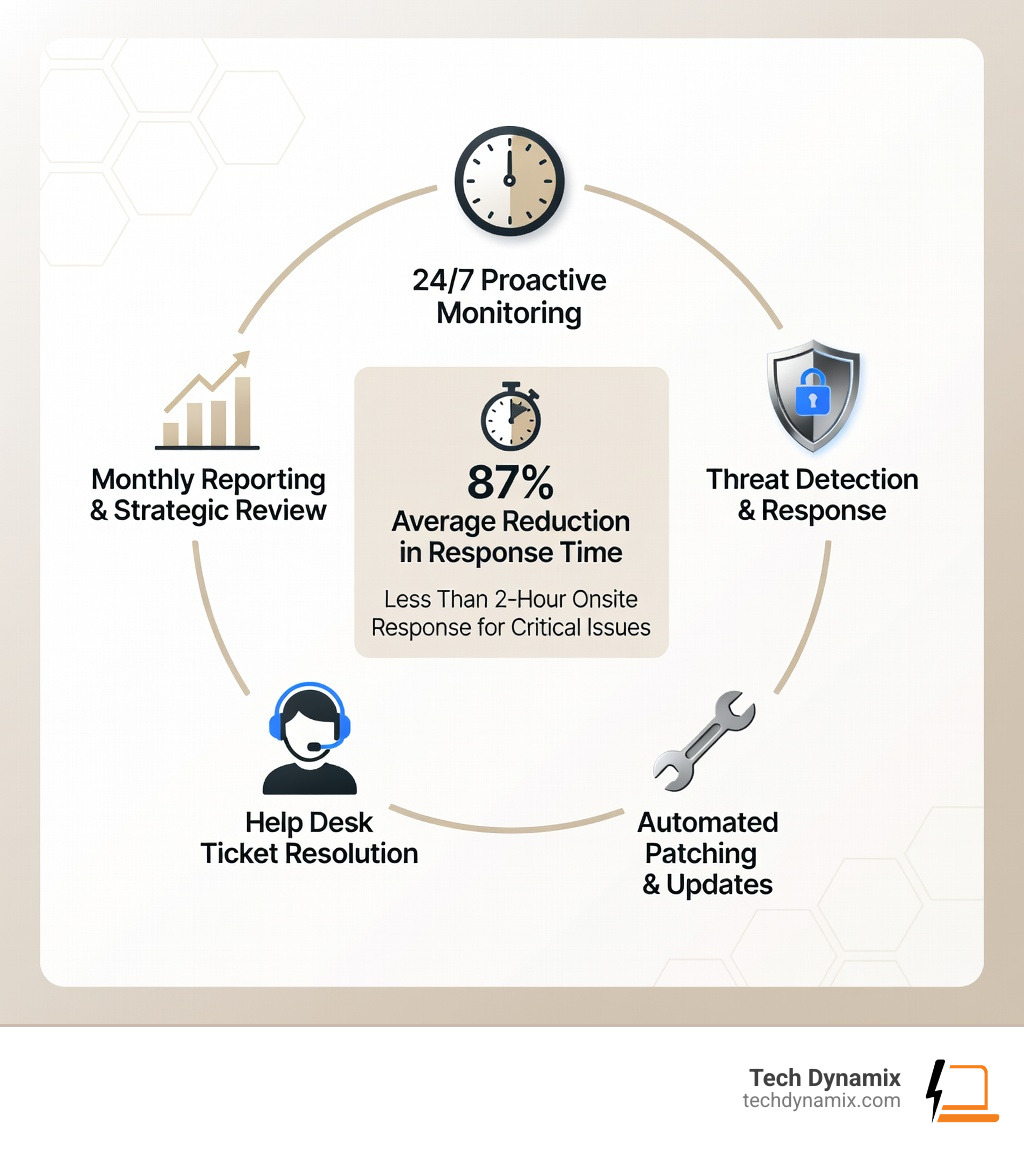
Professional managed IT help replaces “hope” with “certainty.” By utilizing a Managed Service Provider (MSP), you gain access to a team of experts who provide 24/7 monitoring. This results in an average 87% reduction in response times compared to traditional models. When a critical issue does arise, having a local partner means receiving an onsite response in less than two hours, ensuring your business stays upright and operational.

Scaling with Managed IT Help
Growth is exciting, but it brings complexity. As your business expands from Willoughby to Mayfield Heights, your IT needs don’t just grow—they multiply. You might transition to a remote or hybrid work model, requiring secure VPNs and cloud-based collaboration tools.
Managing this transition internally is often a recipe for burnout. Managed IT help provides the scalability you need without the overhead of hiring a dozen new full-time employees. Whether you need to onboard ten new employees next week or migrate your entire infrastructure to a hybrid cloud environment, a managed provider has the tools and manpower to do it seamlessly. For businesses in Lake County, having Mentor IT Support means your technology scales at the same speed as your ambitions.
Choosing the Right Managed IT Help Provider
Not all IT providers are created equal. When you’re looking for a partner to act as your “tech bodyguard,” you need to look beyond the price tag. You need a partner who understands the local landscape—someone who knows the difference between a business in the Chagrin Valley and one in the Cleveland Metro East Corridor.
Key factors to look for include:
- Service Level Agreements (SLAs): Does the provider guarantee response times? Look for providers who offer clear, written commitments for critical issue resolution.
- Local Expertise: Can they get to your office in Painesville or Wickliffe quickly? A provider based halfway across the country can’t help you if your physical switch fails.
- Strategic Vision: Do they offer IT Consulting & Advisory services? You don’t just need someone to fix laptops; you need a partner who can help you build a three-year technology roadmap.
Beyond Break/Fix: The Proactive Advantage
To understand the value of managed IT help, we have to look at what it replaced: the “Break/Fix” model. In the old days (which for some businesses, is still today), you only called a technician when something stopped working. The technician would come out, fix the problem, and send you a hefty bill.
The problem? The technician’s goals were the opposite of yours. They made more money when your systems broke. In the managed model, our goals are perfectly aligned. You pay a flat monthly fee to keep things running. If things break, we work harder without extra pay. Therefore, it is in our best interest—and yours—to ensure nothing breaks in the first place.
| Feature | Traditional Break/Fix | Managed IT Help |
|---|---|---|
| Approach | Reactive (Fix after failure) | Proactive (Prevent failure) |
| Costs | Unpredictable & Spiky | Predictable Monthly Flat-Rate |
| Monitoring | None (You tell them it’s broken) | 24/7 Remote Monitoring (RMM) |
| Updates | Performed manually/rarely | Automated & Scheduled |
| Strategy | None (Tactical only) | Strategic Roadmap & Consulting |
By using Remote Monitoring and Management (RMM), we can see “smoke” before there is a “fire.” If a hard drive in your server in Eastlake starts showing signs of failure at 2 AM, our system alerts us immediately. We can often replace it or migrate the data before your staff even arrives for work at 8 AM. This is the essence of Network Design & Management: building resilience into the system from day one.
Eliminating the “Firefighting” Cycle
Many internal IT managers feel like they are constantly “firefighting”—running from one crisis to the next with no time for strategic projects. Managed IT help breaks this cycle through automation. We implement proactive patching and automated software updates that happen in the background. This ensures your systems are always healthy and your security vulnerabilities are closed before hackers can exploit them.
Co-managed IT for Internal Teams
One of the biggest myths in our industry is that managed IT help is designed to replace internal IT staff. In reality, we often work with them. This is called “Co-managed IT.”
In this setup, your internal person stays in control. They handle the high-level, business-specific projects they enjoy, while we handle the “drudge work”—the password resets, the server patches, and the 24/7 monitoring. This team augmentation fills the skill gaps and allows your internal team to focus on innovation rather than maintenance. It’s about giving them the Services and support they need to succeed.
Key Components of a Managed IT Service Package
When you sign up for managed IT help, you aren’t just buying a phone number to call; you are investing in a comprehensive suite of protections. Think of it as a multi-layered shield for your business.
Cybersecurity and Compliance
Security is not optional. A single data breach can bankrupt a small business. Our Cybersecurity Solutions are built into the fabric of our managed services. This includes:
- Multi-Factor Authentication (MFA): Ensuring that a stolen password isn’t enough to get into your systems.
- Advanced Threat Detection: Using AI-enhanced tools to spot suspicious behavior on your network in real-time.
- Patching and Vulnerability Management: Automatically fixing the holes in your software that cybercriminals love to use.
- Compliance Support: Helping businesses in healthcare or finance meet strict regulatory requirements (like HIPAA or CMMC) through meticulous auditing and reporting.
For businesses utilizing the cloud, we provide specialized Microsoft 365 Cloud Support to ensure your emails and files are as secure as they are accessible. Furthermore, our Business Continuity and Disaster Recovery (BCDR) plans ensure that even if a “worst-case scenario” happens—like a flood in your Painesville office—your data is backed up and recoverable in minutes, not days.
Help Desk and End-User Support
The heart of managed IT help is the people. Our help desk is staffed by experienced professionals who understand that when your computer isn’t working, you aren’t working. We utilize a tiered support system, meaning common issues (Tier 1) are handled instantly, while complex infrastructure problems (Tier 3) are escalated to our senior engineers.
We also handle asset management—tracking your laptops, servers, and software licenses so you always know what you own and when it’s time for an upgrade. This “out of sight, out of mind” approach allows your employees to stay productive without being bogged down by technical glitches.
The Onboarding Journey: From Chaos to Control
Transitioning to a managed IT provider isn’t an overnight switch; it’s a meticulously designed process that typically takes 4 to 6 weeks. We don’t just “take over”—we integrate.
Phase 1: Assessment and Documentation
We start with a deep dive. Our team performs a comprehensive network audit of your Northeast Ohio facility. We look for security gaps, outdated hardware, and “shadow IT” (software your employees are using without your knowledge).
During this phase, we create a detailed asset inventory and document every corner of your environment. This is where our IT Consulting & Advisory expertise shines. We identify the immediate risks and build a plan to stabilize your network.
Phase 2: Implementation and Security Hardening
Once we have the roadmap, we start the “heavy lifting.” This includes:
- Deploying Monitoring Tools: Installing our RMM sensors so we can see your network’s health 24/7.
- Security Hardening: Setting up MFA, configuring firewalls, and establishing Microsoft 365 Defender policies.
- Remote Access Establishment: Ensuring your team can work securely from anywhere in the Greater Cleveland Area.
- Previous Access Removal: For security and compliance, we ensure that old vendors or former employees no longer have “keys” to your digital kingdom.
Maximizing ROI and Operational Efficiency
One of the most significant benefits of managed IT help is the shift from capital expenditure (buying expensive servers every five years) to operational expenditure (a predictable monthly fee).
Measuring Success with Key Metrics
You shouldn’t have to wonder if your IT provider is doing a good job. We provide transparent reporting that shows you exactly what you’re getting for your investment. Key metrics we track include:
- Mean Time to Resolution (MTTR): How fast do we fix problems?
- System Uptime: What percentage of the month were your systems fully operational? (Hint: We aim for 99.9% or better).
- Ticket Volume Trends: Are we seeing fewer “fires” over time? (This proves our proactive maintenance is working).
- ROI Analysis: Comparing the cost of our services against the potential cost of downtime and data breaches.
Pricing typically follows a “per user” or “per device” model, ranging from $30 to $100 per service per device depending on the complexity. This flat-rate model bridges the talent gap, giving you a full team of experts for less than the cost of one mid-level internal IT hire.
Myths vs. Reality in Managed Services
There are several common myths that hold businesses back from seeking managed IT help:
- Myth: “It’s too expensive.” Reality: When you factor in the cost of downtime, data breaches, and hiring, managed services often save businesses 20-40% annually.
- Myth: “I’ll lose control.” Reality: You actually gain more control because you have better data and reporting to make informed business decisions.
- Myth: “We’re too small for this.” Reality: Small businesses are the primary targets for cyberattacks because they often lack professional protection. You are never “too small” to be secure.
By partnering with a provider for Managed Services, you turn your technology from a “necessary evil” into a competitive advantage.
Frequently Asked Questions about Managed IT
What is the difference between managed IT and traditional IT support?
Traditional IT support is “reactive”—you call them when something breaks, and they bill you by the hour. Managed IT is “proactive”—you pay a flat monthly fee for a team that monitors your systems 24/7 to prevent things from breaking in the first place.
How much do managed IT services typically cost for an SMB?
While every business is unique, most SMBs can expect a tiered or à la carte pricing model. Generally, services average between $30 to $100 per device or service, allowing for a predictable monthly budget without “surprise” repair bills.
Can managed IT services work alongside my existing internal IT staff?
Absolutely! This is called “Co-managed IT.” We handle the routine maintenance, monitoring, and help desk tasks, which frees up your internal IT person to focus on high-level strategy and projects that drive your business forward.
Conclusion
At Tech Dynamix, we believe that technology should be a “propeller” for your business, not an “anchor.” For over 20 years, we’ve provided high-quality IT consulting and managed IT help to small and mid-size businesses across Northeast Ohio—from the suburbs of Mentor and Willoughby to the heart of the Cleveland Metro East Corridor.
Whether you are in manufacturing, healthcare, or the non-profit sector, you deserve a technology partner that treats your business with the same care as you do. We don’t just fix computers; we protect your livelihood, secure your data, and help you scale with confidence.
Ready to stop firefighting and start growing? Start your journey with Managed Services today and experience what it feels like when your technology finally “just works.”