What Is a Cloud Based Database — and Why Does It Matter?
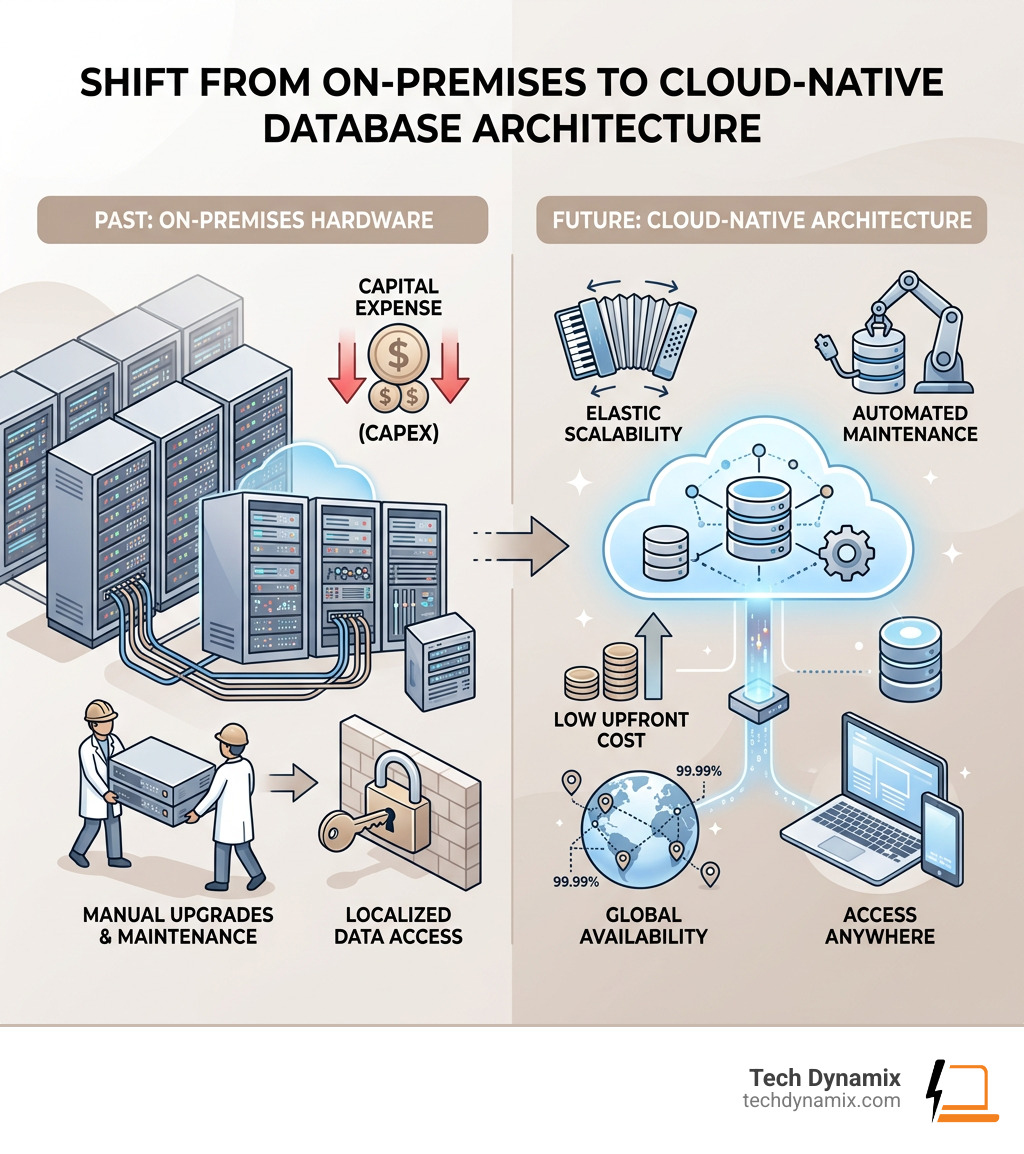
A cloud based database is a database that runs on cloud infrastructure instead of on servers you own and manage yourself. Rather than buying hardware and paying IT staff to maintain it, you access your data over the internet through a cloud provider.
Here is a quick overview of what you need to know:
| Cloud Based Database | Traditional On-Premises Database | |
|---|---|---|
| Infrastructure | Managed by cloud provider | Owned and managed in-house |
| Upfront cost | Low or none | High capital expense |
| Scalability | Instant, elastic | Manual hardware upgrades |
| Maintenance | Automated (backups, patches, updates) | Requires dedicated IT staff |
| Availability | Up to 99.999% uptime SLA | Depends on your own setup |
| Access | Anywhere, any device | Typically on-site or VPN |
The shift is significant. Research from IDC found that up to 75% of enterprise data management costs are labor — people managing, patching, and maintaining databases. Cloud databases automate much of that work.
And the market is moving fast. Analysts at Gartner projected database-platform-as-a-service revenue to approach $10 billion — a clear sign that businesses everywhere are making the switch.
I’m Jay Baruffa, and with over 20 years of hands-on experience in IT infrastructure and systems design, I’ve helped many businesses across Northeast Ohio navigate the shift to a cloud based database setup that is secure, scalable, and cost-effective. In the sections below, I’ll break down everything you need to know — from database types and pricing models to security and real-world use cases.
Cloud based database further reading:
Understanding the Cloud Based Database: Types and Architecture
When we talk about moving your data to the cloud, it isn’t a one-size-fits-all situation. The architecture of a cloud based database is designed to be flexible, but choosing the right “flavor” depends entirely on what your business needs to accomplish. At Tech Dynamix, we often help our clients in the Greater Cleveland Area distinguish between these models to ensure their applications run smoothly.
Relational vs. NoSQL
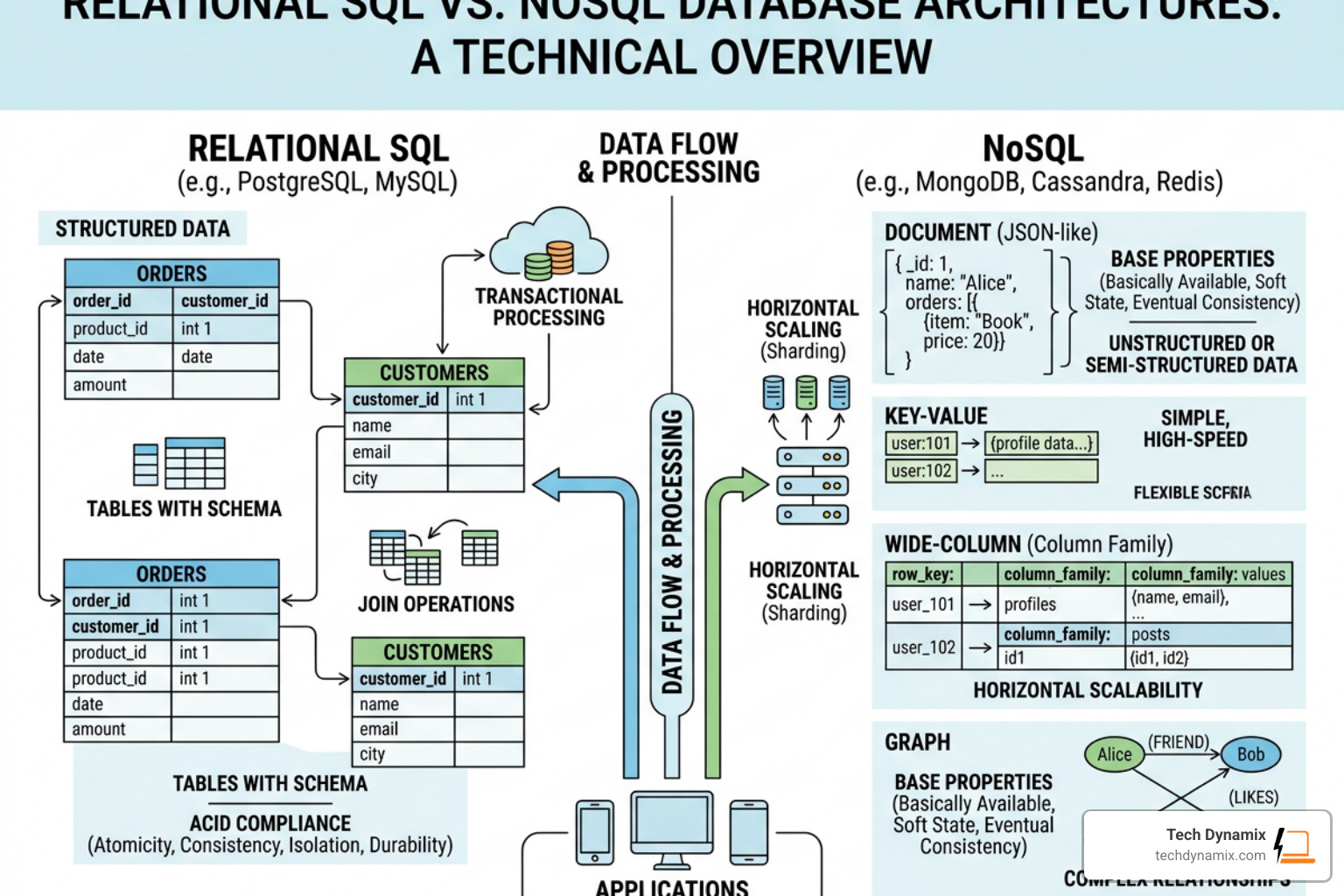
The two primary heavyweights in data are Relational (SQL) and NoSQL databases.
- Relational Databases: These are the traditional stalwarts like MySQL, PostgreSQL, and SQL Server. They use a structured schema and are perfect for applications where data integrity and complex queries are paramount—think accounting software or ERP systems.
- NoSQL Databases: These are built for speed and scale. They are “schema-agnostic,” often using JSON-like documents to store data. This makes them ideal for mobile apps, real-time analytics, and content management where the data structure might change frequently.
| Feature | Relational (SQL) | NoSQL (Document/Key-Value) |
|---|---|---|
| Data Model | Pre-defined tables/rows | Flexible JSON-like documents |
| Consistency | Strong (ACID compliance) | Eventual or Tunable |
| Scaling | Typically Vertical | Horizontal (Distributed) |
| Best For | Transactions, ERP, CRM | IoT, Real-time web, Big Data |
Autonomous and Self-Driving Technology
One of the most exciting trends we are seeing is the rise of the autonomous cloud based database. These systems use machine learning to handle the “grunt work” of database administration. For a deeper look at how the underlying infrastructure works, you can check out our Demystifying Cloud Data Centers: A Comprehensive Guide.
AI-Readiness and Vector Search
Modern cloud databases are now being built with AI in mind. Features like vector search allow databases to handle the complex mathematical representations of data used in machine learning and Generative AI. This means your database isn’t just a filing cabinet anymore; it’s an active participant in powering your AI-driven applications.
The Rise of the Autonomous Cloud Based Database
Imagine a database that patches itself, tunes its own performance, and backs itself up without a human ever lifting a finger. That is the reality of self-driving technology.
Statistics show that roughly 75% of an enterprise’s total data management costs are tied to labor alone. By implementing an autonomous cloud based database, businesses can drastically reduce these costs. These systems offer:
- Automated Patching: Security updates are applied while the system is running, eliminating downtime.
- Self-Tuning: The database learns from query patterns and optimizes indexes automatically.
- Full-Stack Automation: From the firmware up to the database software, everything is managed by AI.
Key Differences from Traditional On-Premises Systems
The move from on-premises to the cloud is a shift from Capital Expenditure (CapEx) to Operating Expenses (OpEx).
- Hardware Elimination: You no longer need to worry about the “server in the closet” or the air conditioning bill for the server room.
- Instant Provisioning: In the old days, adding more storage meant ordering a hard drive and waiting for shipping. In the cloud, it takes a few clicks.
- Maintenance Overhead: On-premises systems require manual updates and hardware troubleshooting. Cloud databases handle this in the background, freeing your team to focus on innovation.
Key Benefits of Modernizing Your Data Infrastructure
Modernizing your data isn’t just about following a trend; it’s about survival in a digital-first economy. When we work with businesses in Northeast Ohio, we see how a cloud based database can transform operational efficiency.
Cost Savings and Efficiency
According to industry research, about 72% of enterprise IT budgets are spent just maintaining existing systems. That leaves a measly 25% for innovation. By moving to a managed cloud environment, you flip that script. You stop paying for “zombie” servers that sit idle and start paying only for what you use. Public cloud database revenue growth continues to soar because the math simply makes sense for most organizations.
High Availability and Disaster Recovery
If your on-premises server fails in Mentor or Willoughby, your business might be offline for hours or days. Cloud providers offer incredible SLA (Service Level Agreement) guarantees, often reaching 99.999% uptime. This is achieved through global reach and built-in redundancy. If one data center has an issue, your data is instantly served from another. For more on how this works, see Your Go-To Guide for Cloud Availability Center Insights.
Scalability and Performance in a Cloud Based Database
Scaling is where the cloud truly shines. There are two ways to do it:
- Vertical Scaling: Giving your existing database more “muscle” (CPU or RAM).
- Horizontal Scaling: Adding more “members to the team” (more database instances) to share the load.
Advanced cloud databases now offer microsecond latency through in-memory processing, which is essential for high-performance applications like fraud detection or real-time gaming leaderboards. With dynamic autoscale, your database can grow during your busiest hours and shrink when everyone goes home, ensuring you never pay for more than you need.
Navigating Pricing Models and Avoiding Hidden Costs
One of the biggest fears we hear from business owners is “bill shock.” It’s easy to start a project and realize a month later that you’ve racked up a huge bill because of a misunderstood pricing model.
Understanding the Models
- Pay-as-you-go: You are billed based on consumption (storage used, data transferred).
- Serverless: The most flexible option. The database literally “disappears” when not in use, and you only pay for the exact seconds it is running.
- Provisioned Throughput: You pay for a set amount of power. If you go over, performance might throttle; if you stay under, you’re paying for unused capacity.
- DTU vs. vCore: In the Azure world, for example, DTUs (Database Transaction Units) offer a bundled measure of power, while vCore models allow you to choose specific hardware specs. For small projects, DTU models are often more predictable and cheaper.
For those interested in a more controlled environment, we often discuss Unlocking the Power of Managed Private Cloud to balance performance and cost.
Avoiding the Pitfalls
To keep costs under control, keep an eye on:
- Data Egress: Moving data into the cloud is usually free, but some providers charge you to move it out.
- Backup Storage: Keeping 10 years of daily backups can get expensive if you don’t use tiered storage (moving old backups to “cold” storage).
- Idle Resources: A forgotten test database can quietly eat your budget. Always set up cost monitoring alerts.
Finding the Right Cloud Based Database for Small Projects
You don’t need an enterprise budget to get started. Many providers offer free tiers or significant credits.
- Azure SQL DTU Basic: Can cost as little as ~$5/month for a 2GB database.
- AWS Free Tier: Offers 750 hours of database services and 20GB of storage for the first year.
- Google Cloud: Often provides $300 in credits for new users.
- Supabase: A great low-cost alternative for PostgreSQL projects.
For very small side projects, you might even consider object storage (like Amazon S3) combined with a query engine, which can be significantly cheaper than a full SQL instance.
Security and Automation: The Future of Data Management
Security is the cornerstone of everything we do at Tech Dynamix. When you use a cloud based database, you aren’t just getting software; you’re getting the protection of thousands of security engineers. Microsoft alone has 34,000 full-time engineers dedicated to security initiatives.
Multi-Layered Protection
- Encryption: Your data is encrypted both “at-rest” (on the disk) and “in-transit” (moving over the wire).
- Identity Management: Integration with tools like Azure AD ensures that only the right people have access.
- Compliance: Major cloud databases meet strict standards like HIPAA for healthcare, ISO 27001, and GDPR.
- Automated Backups: Human error is the #1 cause of data loss. Cloud databases automate the backup process and allow for “point-in-time” recovery, meaning you can roll back your database to exactly how it looked five minutes before a mistake happened.
The Microsoft Digital Defense Report highlights how automated cloud systems are better at defending against modern cyber threats than traditional on-premises setups.
Frequently Asked Questions about Cloud Databases
How do cloud databases reduce enterprise labor costs?
Labor typically accounts for 75% of data management costs. By automating routine tasks like patching, scaling, and backups, your Database Administrators (DBAs) no longer spend their time “keeping the lights on.” Instead, they can focus on high-value work like data modeling, performance tuning for applications, and capacity planning.
What are the best use cases for NoSQL vs Relational cloud databases?
- Relational (SQL): Best for applications requiring ACID transactions and strong consistency. Use this for ecommerce checkouts, financial systems, and ERPs.
- NoSQL: Best for high-volume, unstructured data. Use this for IoT telemetry, social media feeds, real-time personalization, and content management systems where the data format changes often.
How can I avoid “bill shock” when migrating to the cloud?
Start by using auto-pause features for development environments so they don’t run over the weekend. Choose predictable pricing models like the Azure DTU model for smaller workloads. Most importantly, set up budget alerts that email you the moment your spending hits 50% or 75% of your monthly limit.
Conclusion
Your data is a strategic asset, but it can quickly become a liability if it’s trapped in aging, insecure hardware. Moving to a cloud based database is a total game changer because it levels the playing field, giving small and mid-size businesses in Northeast Ohio access to the same power and security used by global giants.
At Tech Dynamix, we specialize in making this transition seamless. Whether you are looking to migrate from an old SQL Server in your office or want to build a new AI-ready application, our team is here to help. We understand the local landscape—from Mentor to the Cleveland Metro East Corridor—and we know how to build technology that supports your business goals.
Ready to modernize? Explore our expertise in Seamless Skies: Unlocking Cloud Migration Expertise or dive deeper into specific platforms with Ohio’s Cloud Frontier: A Deep Dive into Amazon Web Services.
Contact our experts for cloud database management today and let’s turn your data into your greatest competitive advantage.